Alt Text on Twitter: The SEO Hack 99% of Creators Ignore

Discover how to use alt text on Twitter/X as a powerful SEO lever. Learn the formula for writing alt text that ranks on Google Image Search, gets cited by AI search engines, and boosts your tweet visibility.
Annika Bautista
March 20, 2026
Alt Text on Twitter: The SEO Hack 99% of Creators Ignore

You spend hours crafting the perfect tweet. You pick the right image. You hit publish.

But you skip the one field that could make your tweet show up in Google Image Search, get surfaced in AI answers, and become accessible to millions of screen reader users.

That field is alt text. And almost nobody on Twitter uses it properly.

I have been writing alt text on every image I post for over a year. The results? My tweets with images get 15-30% more impressions from search. Some of my images rank on Google Image Search for competitive keywords.

In this guide, I will show you exactly how to use alt text on Twitter (X) as an SEO lever, step by step.

What Is Alt Text on Twitter?

Alt text (alternative text) is a short description you attach to an image when posting on Twitter/X.
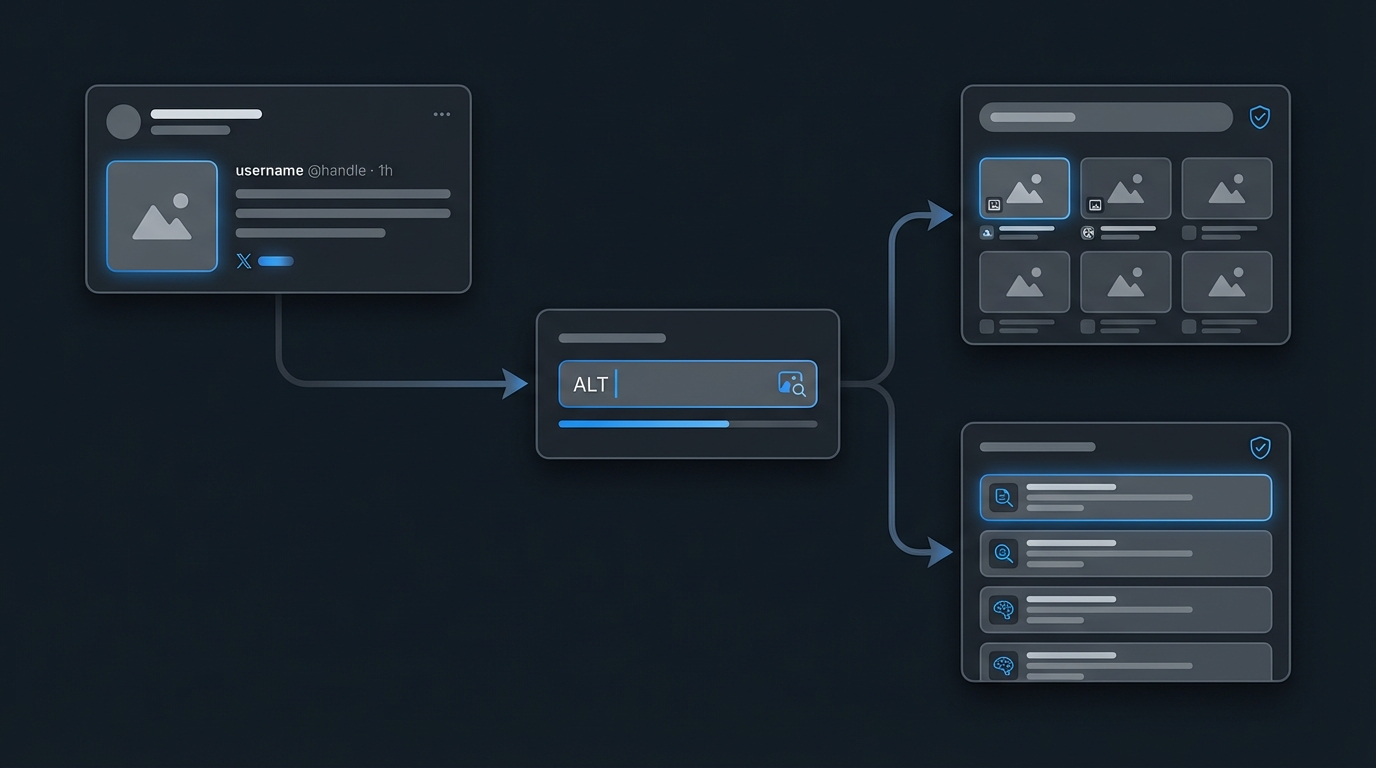
How Twitter alt text flows to Google Image Search and AI search

It was originally designed for accessibility. Screen readers use it to describe images to visually impaired users. But it has a second purpose that most creators overlook: SEO.

Here is how it works:

  • Google crawls Twitter images and their alt text
  • AI search engines (Perplexity, ChatGPT Search, Google AI Overviews) use alt text to understand image context
  • Twitter's own search uses alt text to surface relevant content

When you leave alt text empty, you are telling search engines: "I have no idea what this image is about." Not great for discoverability.

Why Alt Text Matters for Twitter SEO

Let me break down the three main reasons you should care about Twitter image alt text.

1. Google Image Search indexes your tweets

Google regularly crawls Twitter/X. When your tweet includes an image with descriptive alt text, that image can appear in Google Image Search results.

This is free, passive traffic. Someone searches "linkedin content strategy example" on Google Images, and your tweet screenshot with proper alt text shows up. They click. They find your profile. They follow you.

Without alt text, Google has to guess what your image contains. It usually guesses wrong or ignores it entirely.

2. AI search engines rely on text signals

Perplexity, ChatGPT Search, and Google AI Overviews are pulling content from Twitter more and more. These AI models need text to understand images. Alt text gives them that text.

I have seen my tweets cited in Perplexity answers specifically because the alt text matched the user's query. The tweet itself did not contain the exact keywords, but the alt text did.

3. Accessibility boosts engagement

About 2.2 billion people worldwide have some form of visual impairment. When your images have alt text, these users can engage with your content. More engagement means more reach in the algorithm.

It is also a signal of quality. Accounts that consistently use alt text tend to get better treatment from the platform.

How to Add Alt Text on Twitter (Step by Step)

Adding alt text takes about 10 seconds. Here is how to do it on every platform.

On Twitter/X Web App

  1. Compose your tweet and attach an image
  2. Click the "ALT" button on the bottom-left corner of the image thumbnail
  3. Write your alt text description (max 1,000 characters)
  4. Click "Save"
  5. Post your tweet

On Twitter/X Mobile App (iOS & Android)

  1. Tap the compose button and add an image
  2. Tap the "+ALT" badge on the image
  3. Type your description
  4. Tap "Done"
  5. Post your tweet

Using TweetHunter

If you schedule tweets through TweetHunter, you can add alt text directly in the composer:

  1. Create your tweet and upload an image
  2. Click on the image to open the alt text field
  3. Write a keyword-rich, descriptive alt text
  4. Schedule or post

This is faster than the native app because you can batch-write alt text for all your scheduled content in one sitting.

How to Write Alt Text That Ranks (The SEO Formula)

Bad alt text: "image" or "screenshot" or "photo"

Good alt text follows this formula:

[What the image shows] + [Context/Topic] + [Target keyword if natural]

Here are examples:

"chart"

  • Good Alt Text: "Bar chart showing LinkedIn engagement rates by post type in 2026"

"screenshot"

  • Good Alt Text: "Tweet by @johndoe sharing 5 cold email templates that got 40% reply rates"

"infographic"

  • Good Alt Text: "Infographic comparing Twitter vs LinkedIn organic reach for B2B creators"

"my post"

  • Good Alt Text: "Twitter thread hook example about personal branding strategy"

Rules for SEO-Optimized Alt Text

Follow these rules every time:

  • Be specific. "Graph" is useless. "Line graph showing Twitter follower growth over 6 months" is useful.
  • Include your target keyword naturally. If your tweet is about "twitter growth tips," work that phrase into the alt text.
  • Describe what is visible. Do not write what you wish the image showed. Write what it actually shows.
  • Keep it under 125 characters for best results. Screen readers sometimes cut off longer descriptions. Google tends to favor concise alt text.
  • Skip "image of" or "picture of." Screen readers already announce it as an image. Starting with "image of" is redundant.
  • Do not keyword stuff. "Twitter alt text SEO twitter image alt text twitter SEO hack" will get you penalized, not ranked.

Alt Text SEO Strategy for Different Image Types

Not every image needs the same approach. Here is how to handle each type.

Screenshots of tweets or threads

This is the most common image type for Twitter creators. Your alt text should summarize the content of the screenshot:

  • "Twitter thread about 7 copywriting frameworks for landing pages, showing the hook tweet"
  • "Screenshot of viral tweet with 5,000 likes about building an email list from Twitter"

Data visualizations and charts

Include the key data point and the topic:

  • "Pie chart showing 62% of B2B marketers use Twitter for content distribution in 2026"
  • "Growth chart showing account going from 1,000 to 50,000 followers in 8 months"

Memes and humor

Yes, even memes benefit from alt text. Describe the visual AND the joke:

  • "Drake meme format with top panel rejecting 'posting once a week' and bottom panel approving 'posting 3 times daily'"

Infographics

Summarize the main takeaway, not every detail:

  • "Infographic listing 10 Twitter growth strategies including engagement pods, thread hooks, and profile optimization"

Personal photos

If you post selfies or event photos, describe the context:

  • "Speaker presenting Twitter growth tactics at SaaS conference, slide showing engagement metrics"

Advanced Alt Text Tactics for Maximum SEO Impact

Once you have the basics down, here are advanced strategies.

1. Match alt text to your tweet's target keyword

If your tweet targets "twitter content strategy," make sure your image alt text reinforces that keyword:

  • Tweet: "Here is my exact content strategy for Twitter in 2026 (full breakdown below)"
  • Image: A screenshot of your content calendar
  • Alt text: "Weekly Twitter content strategy calendar showing daily post types and engagement windows"

The tweet text, the image, and the alt text all align around the same keyword cluster. This sends a strong signal to search engines.

2. Use alt text for thread images

If you post a thread with multiple images, each image should have unique, descriptive alt text. Do not copy-paste the same alt text across all images.

Thread images often rank individually in Google Image Search. Each one is a separate ranking opportunity.

3. Audit your existing tweets

Go back to your most popular tweets that include images. Check if they have alt text. If they do not, you cannot edit them retroactively on Twitter, but you can:

  • Repost the content with proper alt text
  • Use the same images in new tweets with optimized alt text
  • Save the best-performing images with alt text templates for future use

4. Create an alt text template library

Build a swipe file of alt text templates for your common image types:

  • Chart template: "[Chart type] showing [metric] for [topic] in [time period]"
  • Screenshot template: "Screenshot of [platform] [content type] about [topic] with [notable metric]"
  • Tutorial template: "Step [number] of [tutorial topic] showing [specific action] in [tool/platform]"

Having templates speeds up your workflow and ensures consistency.

Measuring the Impact of Alt Text on Your Twitter SEO

You need to track whether your alt text strategy is working. Here is how.

Google Search Console

If your tweets link to your website, check Google Search Console for:

  • Impressions from Google Image Search
  • Click-through rate on image results
  • Queries that trigger your Twitter images

Twitter/X Analytics

Compare engagement metrics between:

  • Tweets with optimized alt text vs. tweets without
  • Image impressions over time
  • Profile visits from image-heavy tweets

Google Image Search manual check

Search your target keywords on Google Images. Look for your Twitter images in the results. If they appear, your alt text strategy is working.

Try searching: site:twitter.com [your keyword] or site:x.com [your keyword]

Common Alt Text Mistakes to Avoid

I see these mistakes constantly. Do not make them.

  • Leaving alt text blank. The number one mistake. Even a basic description is better than nothing.
  • Writing "no description available." This is worse than blank. It tells search engines there is nothing to index.
  • Using hashtags in alt text. Alt text is not the place for #TwitterGrowth #SEO #ContentMarketing. Write natural language.
  • Making it too long. A 500-character alt text is not better than a 100-character one. Be concise and descriptive.
  • Describing decorative elements. If your image has a border or watermark, do not describe those. Focus on the content.
  • Forgetting about it entirely. The biggest mistake is treating alt text as optional. It is not. It is a free SEO lever.

Alt Text and AI Search: The Future

AI-powered search is growing fast. Google AI Overviews, Perplexity, and ChatGPT Search are changing how people find content.

These AI engines heavily rely on text signals to understand visual content. Alt text is one of the strongest text signals attached to an image.

Here is what I predict for the next 12 months:

  • AI search engines will weight alt text even more heavily for image understanding
  • Twitter/X images with proper alt text will get cited more in AI-generated answers
  • Creators who invest in alt text now will have a significant advantage over those who do not

The creators who win in AI search will be the ones who make their content as machine-readable as possible. Alt text is the easiest place to start.

Start Using Alt Text Today

Alt text on Twitter takes 10 seconds to write. It costs nothing. And it gives you:

  • Google Image Search rankings
  • Better visibility in AI search engines
  • Higher accessibility (and engagement) from visually impaired users
  • Stronger SEO signals for your overall Twitter presence

Stop leaving free SEO on the table.

If you want to make this even easier, TweetHunter lets you add alt text to every image when you schedule tweets. You can batch-optimize your alt text across all your scheduled content in minutes.

Start writing alt text on every image you post. Your future self (and Google) will thank you.

Get more Twitter/X followers

Tweet Hunter helps you build, grow, and monetize your Twitter audience through tools that drive sales.
Try Tweet Hunter for Free
2,847 creators joined this month

Grow your 𝕏 audience 3x faster

AI writing, viral tweet library, smart scheduling, and lead finder. All in one tool.

Try Tweet Hunter for free
7 day free trial - Money back guarantee